🔎 Course Insights 🔎
## Link for the DEMO VIDEO: https://www.youtube.com/watch?v=7ftauN3dMcQ
## Link for the WEB APP: https://kuankongy.github.io/CourseInsights/
[Description](#-project-description-and--functionality) •
[How to use?](#-how-to-use-web-app) •
[Configuration](#%EF%B8%8F-configuring-your-environment) •
[Commands](#-project-commands) •
[Contribution](#ℹ%EF%B8%8F-contribution)
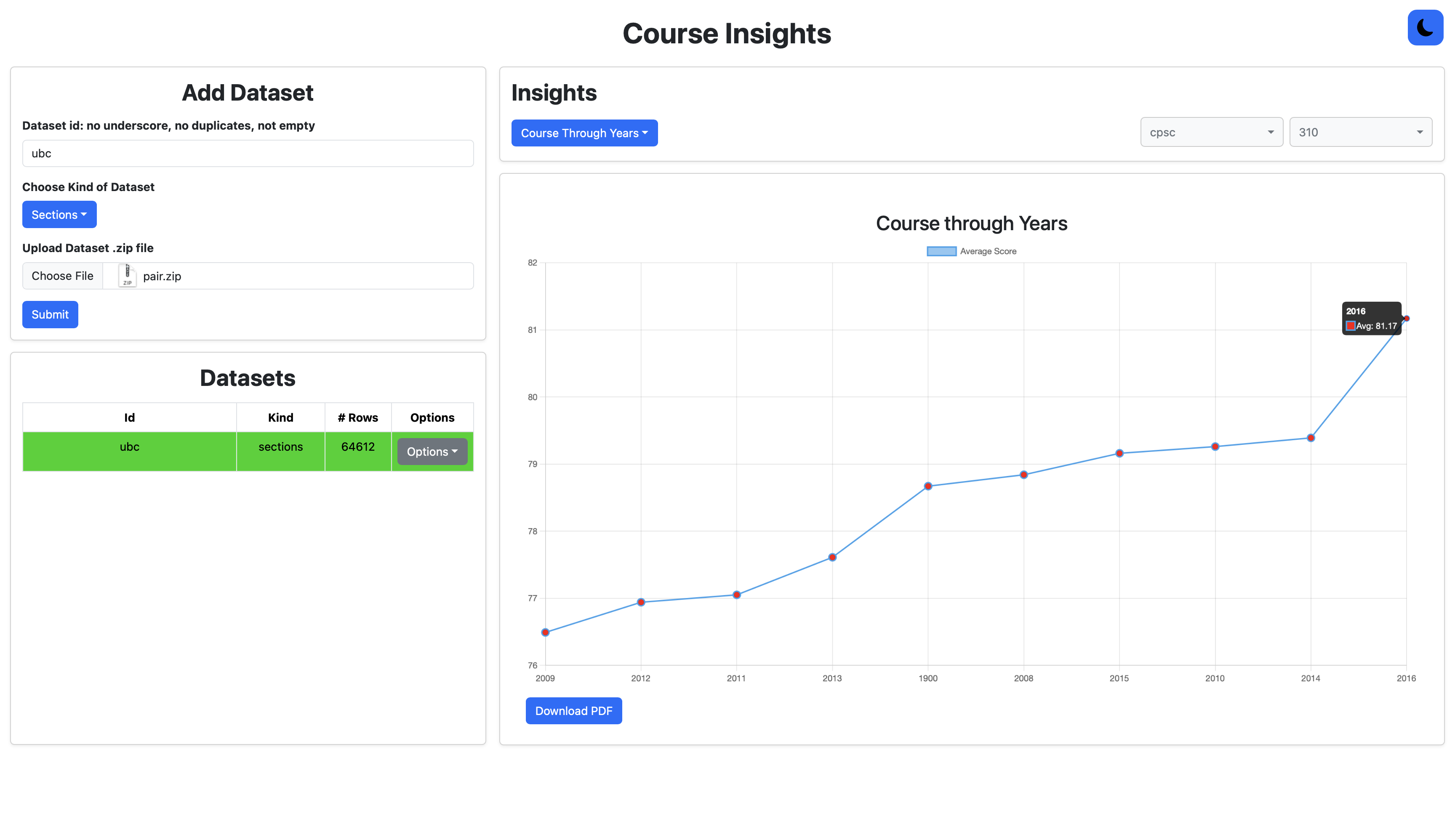 ## 📘 Project Description and 🚀 Functionality
### Descritpion:
A full-stack web application designed to help students easily search and filter UBC history of courses based on custom criteria such as year, course name, department, and instructor. The platform simplifies course planning by providing a responsive, user-friendly interface and efficient querying.
## 🛠️ Technology Stack
## 📘 Project Description and 🚀 Functionality
### Descritpion:
A full-stack web application designed to help students easily search and filter UBC history of courses based on custom criteria such as year, course name, department, and instructor. The platform simplifies course planning by providing a responsive, user-friendly interface and efficient querying.
## 🛠️ Technology Stack
### Frontend
[](https://react.dev)
[](https://www.typescriptlang.org/)
[](#)
[](#)
[](#)

### Backend
[](https://nodejs.org/en)
[](https://www.typescriptlang.org/)
[](#)
[](#)
### DevOps, CI/CD
[](#)
[](#)
[](#)
[](#)
[](#)
[](#)
[](#)
[](#)
### Testing
[](#)
[](#)
[](#)
- Backend: TypeScript, Node.js, Express.js
- Facade Architecture: A central Facade class abstracts core logic for dataset processing and query execution, allowing the REST API to stay clean and adaptable to different datasets (e.g., Sections, Rooms).
- Dataset Processor: Extracts and parses ZIP archives containing JSON or HTML (via JSZip and parse5), transforming them into structured JSON records suitable for querying.
- Query Engine: Executes SQL-like operations (filtering, grouping, aggregation, ordering, projection) on schema-less datasets with consistent internal structure.
- REST API Server: Stateless Express endpoints delegate to the Facade class, maintaining separation of concerns and supporting different UIs.
- Frontend: React, Vite, HTML/CSS, Bootstrap
- Interactive UI for searching courses by year, course, instructor, department and getting insights about average grades, top courses, instructors.
- PDF download feature for visual insights (linear and bar charts).
- Light/Dark mode button.
- Testing: Mocha + Chai, Supertest
- Comprehensive unit, integration and end-to-end test suite coverage of use cases for dataset processing logic, query engine rules, and API endpoints.
- Queries must follow EBNF rules.
- Deployment: Server hosted on Heroku, UI hosted on Github Pages.
### Functionality:
- Allows uploading zip files in JSON format of Sections history from local environment.
- Allows choosing between all uploaded datasets for insights and their removal.
- Provides 9 visual insights:
- Course Through Years: select course code and number (e.g., CPSC 310) and get a line chart, which shows years ordered by highest overall average.
- Instructor's History: select instructor (e.g., Norm Huthinson) and get a line charts, which shows all courses taught with total average and total sections taught of a course.
- Sections: select year, course code and number (e.g., CPSC 310 2015) and get a bar chart, which shows sections taught with average and pass/fail count.
- Top By Average Courses: shows a bar chart of courses ordered by highest overall average through years.
- Top By Average Instructors: shows a bar chart of instructors ordered by highest overall average of all courses taught through years.
- Top Courses by Department: select a department (course code, e.g., CPSC) and get a line chart of courses ordered by highest overall average through years.
- Top Department: shows a bar chart of departments (course code) ordered by highest overall average of all courses of department through years.
- Top Instructor Per Course: select course code and number (e.g., CPSC 310) and get a line chart of instructors ordered by highest overall average through years.
#### Remarks:
- Zip files must be formatted per fules, but they don't have to be from UBC. Query requests and options for insights are build based on provided dataset.
- Backend code implements Facade pattern to allow different Frontend usages. This UI implements Section Insights but Backend also could support Campus Explorer.
## 🗿 How to use web app?
In [demo/](./demo/) folder you can find and download [pair.zip](./demo/pair.zip) file with history of UBC courses from 2007-2016 that you can upload and get insights. Submit as `Sections` kind. Demo video covers all features and how to get specific information, insight from data.
## ⚙️ Configuring your environment
To start using this project, you need to get your development environment configured so that you can build and execute the code.
To do this, follow these steps; the specifics of each step will vary based on your operating system:
1. [Install git](https://git-scm.com/downloads) (v2.X). You should be able to execute `git --version` on the command line after installation is complete.
1. [Install Node (Current)](https://nodejs.org/en/download/) (Current: v23.X), which will also install NPM (you should be able to execute `node --version` and `npm --version` on the command line).
1. [Install Yarn](https://yarnpkg.com/en/docs/install) (1.22.X). You should be able to execute `yarn --version`.
## 💻 Project commands
Once your environment is configured you need to further prepare the project's tooling and dependencies. For **demo usage locally** and **installation**, you only need first and last commands.
### In the project folder:
1. To download the packages specified in your project's *package.json* to the *node_modules* directory:
```shell
yarn install
```
2. To compile your project:
```shell
yarn build
```
You must run this command after making changes to your TypeScript files. If it does not build locally, AutoTest will not be able to build it. This will also run formatting and linting, so make sure to fix those errors too!
3. To run the test suite:
```shell
yarn test
```
- To run with coverage, run:
```shell
yarn cover
```
4. To format your project code.
```shell
yarn prettier:fix
```
5. To see lint errors in your project code.
```shell
yarn lint:check
```
- You may be able to fix some of them using:
```shell
yarn lint:fix
```
6. To start the server running on local port:
```shell
yarn start
```
If you are curious, some of these commands are actually shortcuts defined in [package.json -> scripts](./package.json).
### In the `frontend/` directory:
1. To download the packages specified in your project's *package.json* to the *node_modules* directory.
```shell
npm install
```
2. To run the web site on: http://localhost:5173/CourseFinder/
```shell
npm run dev
```
If you are curious, some of these commands are actually shortcuts defined in [frontend/package.json -> scripts](./frontend/package.json).
## ℹ️ Contribution:
Teamwork Agreement and Architecture design plan of each sprint can be found in [info/](./info/) folder.
Daily and Weekly Scrum meetings' results and Journals, and User Stories and Backlog of each sprint can be found in `Issues`.
- Nam Le (nledinh@student.ubc.ca)
- Martin de Juan (https://www.linkedin.com/in/martin-de-juan-4b50a4264/)
### License
While the readings for this course are licensed using [CC-by-SA](https://creativecommons.org/licenses/by-sa/3.0/), **checkpoint descriptions and implementations are considered private materials**. Please do not post or share your project solutions. We go to considerable lengths to make the project an interesting and useful learning experience for this course. This is a great deal of work, and while future students may be tempted by your solutions, posting them does not do them any real favours. Please be considerate with these private materials and not pass them along to others, make your repos public, or post them to other sites online.
### Usage and Sharing Policy
This repository and its contents are strictly private and must not be made publicly accessible in whole or in part. However, with explicit endorsement from Nick Bradley and Katharine Kerr—course instructors for CPSC 310 2024W2—developers of this project are permitted to share a demo deployment of the application and private repository access with prospective employers or recruiters for the purpose of showcasing their work, provided that:
- The repository remains private.
- Access is limited to specific individuals via GitHub invitation or secure methods.
- No public posting or unrestricted link-based access is permitted.