
Collecting Job Data Using APIs
Estimated time needed: 30 minutes
Objectives
After completing this lab, you will be able to:
- Collect job data using Jobs API
- Store the collected data into an excel spreadsheet.
Note: Before starting with the assignment make sure to read all the instructions and then move ahead with the coding part.
Instructions
To run the actual lab, firstly you need to click on the Jobs_API notebook link. The file contains flask code which is required to run the Jobs API data.
Now, to run the code in the file that opens up follow the below steps.
Step1: Download the file.
Step2: Upload the file into your current Jupyter environment using the upload button in your Jupyter interface. Ensure that the file is in the same folder as your working .ipynb file.
Step 2: If working in a local Jupyter environment, use the "Upload" button in your Jupyter interface to upload the Jobs_API notebook into the same folder as your current .ipynb file.
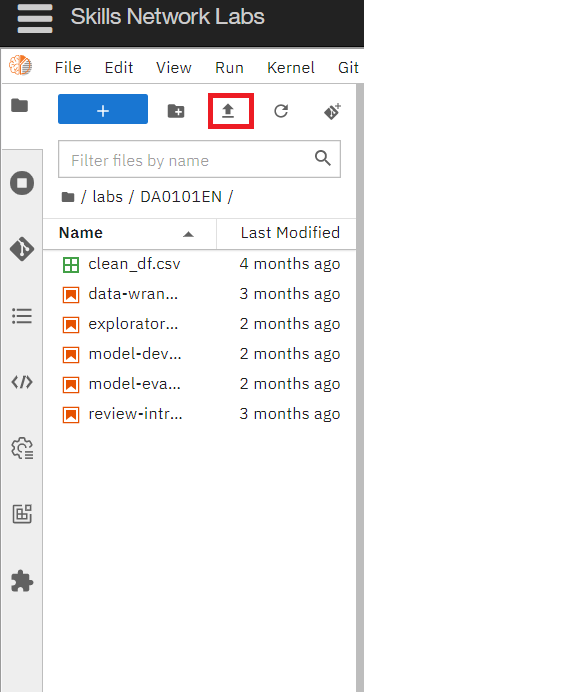
Step3: Open the Jobs_API notebook, and run all the cells to start the Flask application. Once the server is running, you can access the API from the URL provided in the notebook.
If you want to learn more about flask, which is optional, you can click on this link here.
Once you run the flask code, you can start with your assignment.
Dataset Used in this Assignment
The dataset used in this lab comes from the following source: https://www.kaggle.com/promptcloud/jobs-on-naukricom under the under a Public Domain license.
Note: We are using a modified subset of that dataset for the lab, so to follow the lab instructions successfully please use the dataset provided with the lab, rather than the dataset from the original source.
The original dataset is a csv. We have converted the csv to json as per the requirement of the lab.
Warm-Up Exercise
Before you attempt the actual lab, here is a fully solved warmup exercise that will help you to learn how to access an API.
Using an API, let us find out who currently are on the International Space Station (ISS).
The API at http://api.open-notify.org/astros.json gives us the information of astronauts currently on ISS in json format.
You can read more about this API at http://open-notify.org/Open-Notify-API/People-In-Space/
import requests # you need this module to make an API call
import pandas as pd
api_url = "http://api.open-notify.org/astros.json" # this url gives use the astronaut data
response = requests.get(api_url) # Call the API using the get method and store the
                                # output of the API call in a variable called response.
if response.ok:             # if all is well() no errors, no network timeouts)
    data = response.json()  # store the result in json format in a variable called data
                            # the variable data is of type dictionary.
print(data) # print the data just to check the output or for debugging
{'people': [{'craft': 'ISS', 'name': 'Oleg Kononenko'}, {'craft': 'ISS', 'name': 'Nikolai Chub'}, {'craft': 'ISS', 'name': 'Tracy Caldwell Dyson'}, {'craft': 'ISS', 'name': 'Matthew Dominick'}, {'craft': 'ISS', 'name': 'Michael Barratt'}, {'craft': 'ISS', 'name': 'Jeanette Epps'}, {'craft': 'ISS', 'name': 'Alexander Grebenkin'}, {'craft': 'ISS', 'name': 'Butch Wilmore'}, {'craft': 'ISS', 'name': 'Sunita Williams'}, {'craft': 'Tiangong', 'name': 'Li Guangsu'}, {'craft': 'Tiangong', 'name': 'Li Cong'}, {'craft': 'Tiangong', 'name': 'Ye Guangfu'}], 'number': 12, 'message': 'success'}
Print the number of astronauts currently on ISS.
people = data.get('people')
ISS_astronauts = []
for p in people:
    if p['craft'] == 'ISS':
        ISS_astronauts.append(p)
print(len(ISS_astronauts))
9
Print the names of the astronauts currently on ISS.
print("There are {} astronauts on ISS".format(len(ISS_astronauts)))
print("And their names are :")
for astronaut in ISS_astronauts:
    print(astronaut.get('name'))
There are 9 astronauts on ISS
And their names are :
Oleg Kononenko
Nikolai Chub
Tracy Caldwell Dyson
Matthew Dominick
Michael Barratt
Jeanette Epps
Alexander Grebenkin
Butch Wilmore
Sunita Williams
Hope the warmup was helpful. Good luck with your next lab!
Lab: Collect Jobs Data using Jobs API
Objective: Determine the number of jobs currently open for various technologies and for various locations
Collect the number of job postings for the following locations using the API:
- Los Angeles
- New York
- San Francisco
- Washington DC
- Seattle
- Austin
- Detroit
#Import required libraries
import pandas as pd
import json
https://cf-courses-data.s3.us.cloud-object-storage.appdomain.cloud/IBM-DA0321EN-SkillsNetwork/labs/module%201/Accessing%20Data%20Using%20APIs/jobs.json#### Write a function to get the number of jobs for the Python technology.
Note: While using the lab you need to pass the payload information for the params attribute in the form of key value pairs. Refer the ungraded rest api lab in the course Python for Data Science, AI & Development link
The keys in the json are
-
Job Title
-
Job Experience Required
-
Key Skills
-
Role Category
-
Location
-
Functional Area
-
Industry
-
Role
You can also view the json file contents from the following json URL.
api_url="https://cf-courses-data.s3.us.cloud-object-storage.appdomain.cloud/IBM-DA0321EN-SkillsNetwork/labs/module%201/Accessing%20Data%20Using%20APIs/jobs.json"

def get_number_of_jobs_T(technology):
    #your code goes here

    response = requests.get(api_url, params={"Key Skills": technology})
    if response.ok:             # if all is well() no errors, no network timeouts)
        data = response.json()
    number_of_jobs = 0
    for j in data:
        if technology.lower() in j['Key Skills'].lower().replace('| ', '|').replace(' |', '|').strip().split('|'):
            number_of_jobs += 1
    return technology, number_of_jobs
Calling the function for Python and checking if it works.
get_number_of_jobs_T("Python")
('Python', 1165)
Write a function to find number of jobs in US for a location of your choice
 def get_number_of_jobs_L(location):

    #your coe goes here
    response = requests.get(api_url, params={"Location": location})
    if response.ok:             # if all is well() no errors, no network timeouts)
        data = response.json()
    number_of_jobs = 0
    for j in data:
        if location.lower() in j['Location'].lower().strip():
            number_of_jobs += 1
    return location, number_of_jobs
Call the function for Los Angeles and check if it is working.
#your code goes here
get_number_of_jobs_L('Los Angeles')
('Los Angeles', 640)
Store the results in an excel file
Call the API for all the given technologies above and write the results in an excel spreadsheet.
If you do not know how create excel file using python, double click here for hints.
Create a python list of all technologies for which you need to find the number of jobs postings.
#your code goes here
technologies = ['C', 'C#', 'C++', 'Java', 'JavaScript', 'Python', 'Scala', 'Oracle', 'SQL Server', 'MySQL Server', 'PostgreSQL', 'MongoDB']
Import libraries required to create excel spreadsheet
# your code goes here
!pip install xlrd
!pip install openpyxl
import xlrd, openpyxl
Requirement already satisfied: xlrd in /home/jupyterlab/conda/envs/python/lib/python3.7/site-packages (1.2.0)
Collecting openpyxl
Downloading openpyxl-3.1.3-py2.py3-none-any.whl (251 kB)
[2K [90m━━━━━━━━━━━━━━━━━━━━━━━━━━━━━━━━━━━━━━━[0m [32m251.3/251.3 kB[0m [31m9.3 MB/s[0m eta [36m0:00:00[0m
[?25hCollecting et-xmlfile (from openpyxl)
Downloading et_xmlfile-1.1.0-py3-none-any.whl (4.7 kB)
Installing collected packages: et-xmlfile, openpyxl
Successfully installed et-xmlfile-1.1.0 openpyxl-3.1.3
Create a workbook and select the active worksheet
# your code goes here
wb = openpyxl.Workbook()               # create a workbook object
ws = wb.active                         # use the active worksheet
Find the number of jobs postings for each of the technology in the above list. Write the technology name and the number of jobs postings into the excel spreadsheet.
#your code goes here
for t in technologies:
    ws.append(get_number_of_jobs_T(t))   # add a row with two columns
Save into an excel spreadsheet named job-postings.xlsx.
#your code goes here
wb.save("job-postings.xlsx")            # save the workbook into a file called countries.xlsx
In the similar way, you can try for below given technologies and results can be stored in an excel sheet.
Collect the number of job postings for the following languages using the API:
- C
- C#
- C++
- Java
- JavaScript
- Python
- Scala
- Oracle
- SQL Server
- MySQL Server
- PostgreSQL
- MongoDB
Authors
Ayushi Jain
Other Contributors
Rav Ahuja
Lakshmi Holla
Malika
Copyright © IBM Corporation.