
Finding Duplicates Lab
Estimated time needed: 30 minutes
Introduction
Data wrangling is a critical step in preparing datasets for analysis, and handling duplicates plays a key role in ensuring data accuracy. In this lab, you will focus on identifying and removing duplicate entries from your dataset.
Objectives
In this lab, you will perform the following:
- Identify duplicate rows in the dataset and analyze their characteristics.
- Visualize the distribution of duplicates based on key attributes.
- Remove duplicate values strategically based on specific criteria.
- Outline the process of verifying and documenting duplicate removal.
Hands on Lab
Install the needed library
!pip install pandas
!pip install matplotlib
Requirement already satisfied: pandas in /opt/conda/lib/python3.12/site-packages (3.0.0)
Requirement already satisfied: numpy>=1.26.0 in /opt/conda/lib/python3.12/site-packages (from pandas) (2.4.1)
Requirement already satisfied: python-dateutil>=2.8.2 in /opt/conda/lib/python3.12/site-packages (from pandas) (2.9.0.post0)
Requirement already satisfied: six>=1.5 in /opt/conda/lib/python3.12/site-packages (from python-dateutil>=2.8.2->pandas) (1.17.0)
Requirement already satisfied: matplotlib in /opt/conda/lib/python3.12/site-packages (3.10.8)
Requirement already satisfied: contourpy>=1.0.1 in /opt/conda/lib/python3.12/site-packages (from matplotlib) (1.3.3)
Requirement already satisfied: cycler>=0.10 in /opt/conda/lib/python3.12/site-packages (from matplotlib) (0.12.1)
Requirement already satisfied: fonttools>=4.22.0 in /opt/conda/lib/python3.12/site-packages (from matplotlib) (4.61.1)
Requirement already satisfied: kiwisolver>=1.3.1 in /opt/conda/lib/python3.12/site-packages (from matplotlib) (1.4.9)
Requirement already satisfied: numpy>=1.23 in /opt/conda/lib/python3.12/site-packages (from matplotlib) (2.4.1)
Requirement already satisfied: packaging>=20.0 in /opt/conda/lib/python3.12/site-packages (from matplotlib) (24.2)
Requirement already satisfied: pillow>=8 in /opt/conda/lib/python3.12/site-packages (from matplotlib) (12.1.0)
Requirement already satisfied: pyparsing>=3 in /opt/conda/lib/python3.12/site-packages (from matplotlib) (3.3.2)
Requirement already satisfied: python-dateutil>=2.7 in /opt/conda/lib/python3.12/site-packages (from matplotlib) (2.9.0.post0)
Requirement already satisfied: six>=1.5 in /opt/conda/lib/python3.12/site-packages (from python-dateutil>=2.7->matplotlib) (1.17.0)
Import pandas module
import pandas as pd
Import matplotlib
import matplotlib.pyplot as plt
import textwrap
Load the dataset into a dataframe
Read Data
We utilize the pandas.read_csv() function for reading CSV files. However, in this version of the lab, which operates on JupyterLite, the dataset needs to be downloaded to the interface using the provided code below.
# Load the dataset directly from the URL
file_path = "https://cf-courses-data.s3.us.cloud-object-storage.appdomain.cloud/VYPrOu0Vs3I0hKLLjiPGrA/survey-data-with-duplicate.csv"
df = pd.read_csv(file_path)

# Display the first few rows
print(df.head())
   ResponseId                      MainBranch                 Age  \
0           1  I am a developer by profession  Under 18 years old
1           2  I am a developer by profession     35-44 years old
2           3  I am a developer by profession     45-54 years old
3           4           I am learning to code     18-24 years old
4           5  I am a developer by profession     18-24 years old

            Employment RemoteWork   Check  \
0  Employed, full-time     Remote  Apples
1  Employed, full-time     Remote  Apples
2  Employed, full-time     Remote  Apples
3   Student, full-time        NaN  Apples
4   Student, full-time        NaN  Apples

                                    CodingActivities  \
0                                              Hobby
1  Hobby;Contribute to open-source projects;Other...
2  Hobby;Contribute to open-source projects;Other...
3                                                NaN
4                                                NaN

                                             EdLevel  \
0                          Primary/elementary school
1       Bachelor’s degree (B.A., B.S., B.Eng., etc.)
2    Master’s degree (M.A., M.S., M.Eng., MBA, etc.)
3  Some college/university study without earning ...
4  Secondary school (e.g. American high school, G...

                                           LearnCode  \
0                             Books / Physical media
1  Books / Physical media;Colleague;On the job tr...
2  Books / Physical media;Colleague;On the job tr...
3  Other online resources (e.g., videos, blogs, f...
4  Other online resources (e.g., videos, blogs, f...

                                     LearnCodeOnline  ... JobSatPoints_6  \
0                                                NaN  ...            NaN
1  Technical documentation;Blogs;Books;Written Tu...  ...            0.0
2  Technical documentation;Blogs;Books;Written Tu...  ...            NaN
3  Stack Overflow;How-to videos;Interactive tutorial  ...            NaN
4  Technical documentation;Blogs;Written Tutorial...  ...            NaN

  JobSatPoints_7 JobSatPoints_8 JobSatPoints_9 JobSatPoints_10  \
0            NaN            NaN            NaN             NaN
1            0.0            0.0            0.0             0.0
2            NaN            NaN            NaN             NaN
3            NaN            NaN            NaN             NaN
4            NaN            NaN            NaN             NaN

  JobSatPoints_11           SurveyLength SurveyEase ConvertedCompYearly JobSat
0             NaN                    NaN        NaN                 NaN    NaN
1             0.0                    NaN        NaN                 NaN    NaN
2             NaN  Appropriate in length       Easy                 NaN    NaN
3             NaN               Too long       Easy                 NaN    NaN
4             NaN              Too short       Easy                 NaN    NaN

[5 rows x 114 columns]
Load the data into a pandas dataframe:
Note: If you are working on a local Jupyter environment, you can use the URL directly in the pandas.read_csv() function as shown below:
# df = pd.read_csv("https://cf-courses-data.s3.us.cloud-object-storage.appdomain.cloud/n01PQ9pSmiRX6520flujwQ/survey-data.csv")
Identify and Analyze Duplicates
Task 1: Identify Duplicate Rows
- Count the number of duplicate rows in the dataset.
- Display the first few duplicate rows to understand their structure.
## Write your code here
duplicate_rows = df[df.duplicated()]
print('Number of duplicate rows:', len(duplicate_rows))
print(df.shape)
print(duplicate_rows.head())
Number of duplicate rows: 20
(65457, 114)
       ResponseId                      MainBranch                 Age  \
65437           1  I am a developer by profession  Under 18 years old
65438           2  I am a developer by profession     35-44 years old
65439           3  I am a developer by profession     45-54 years old
65440           4           I am learning to code     18-24 years old
65441           5  I am a developer by profession     18-24 years old

                Employment RemoteWork   Check  \
65437  Employed, full-time     Remote  Apples
65438  Employed, full-time     Remote  Apples
65439  Employed, full-time     Remote  Apples
65440   Student, full-time        NaN  Apples
65441   Student, full-time        NaN  Apples

                                        CodingActivities  \
65437                                              Hobby
65438  Hobby;Contribute to open-source projects;Other...
65439  Hobby;Contribute to open-source projects;Other...
65440                                                NaN
65441                                                NaN

                                                 EdLevel  \
65437                          Primary/elementary school
65438       Bachelor’s degree (B.A., B.S., B.Eng., etc.)
65439    Master’s degree (M.A., M.S., M.Eng., MBA, etc.)
65440  Some college/university study without earning ...
65441  Secondary school (e.g. American high school, G...

                                               LearnCode  \
65437                             Books / Physical media
65438  Books / Physical media;Colleague;On the job tr...
65439  Books / Physical media;Colleague;On the job tr...
65440  Other online resources (e.g., videos, blogs, f...
65441  Other online resources (e.g., videos, blogs, f...

                                         LearnCodeOnline  ... JobSatPoints_6  \
65437                                                NaN  ...            NaN
65438  Technical documentation;Blogs;Books;Written Tu...  ...            0.0
65439  Technical documentation;Blogs;Books;Written Tu...  ...            NaN
65440  Stack Overflow;How-to videos;Interactive tutorial  ...            NaN
65441  Technical documentation;Blogs;Written Tutorial...  ...            NaN

      JobSatPoints_7 JobSatPoints_8 JobSatPoints_9 JobSatPoints_10  \
65437            NaN            NaN            NaN             NaN
65438            0.0            0.0            0.0             0.0
65439            NaN            NaN            NaN             NaN
65440            NaN            NaN            NaN             NaN
65441            NaN            NaN            NaN             NaN

      JobSatPoints_11           SurveyLength SurveyEase ConvertedCompYearly  \
65437             NaN                    NaN        NaN                 NaN
65438             0.0                    NaN        NaN                 NaN
65439             NaN  Appropriate in length       Easy                 NaN
65440             NaN               Too long       Easy                 NaN
65441             NaN              Too short       Easy                 NaN

      JobSat
65437    NaN
65438    NaN
65439    NaN
65440    NaN
65441    NaN

[5 rows x 114 columns]
Task 2: Analyze Characteristics of Duplicates
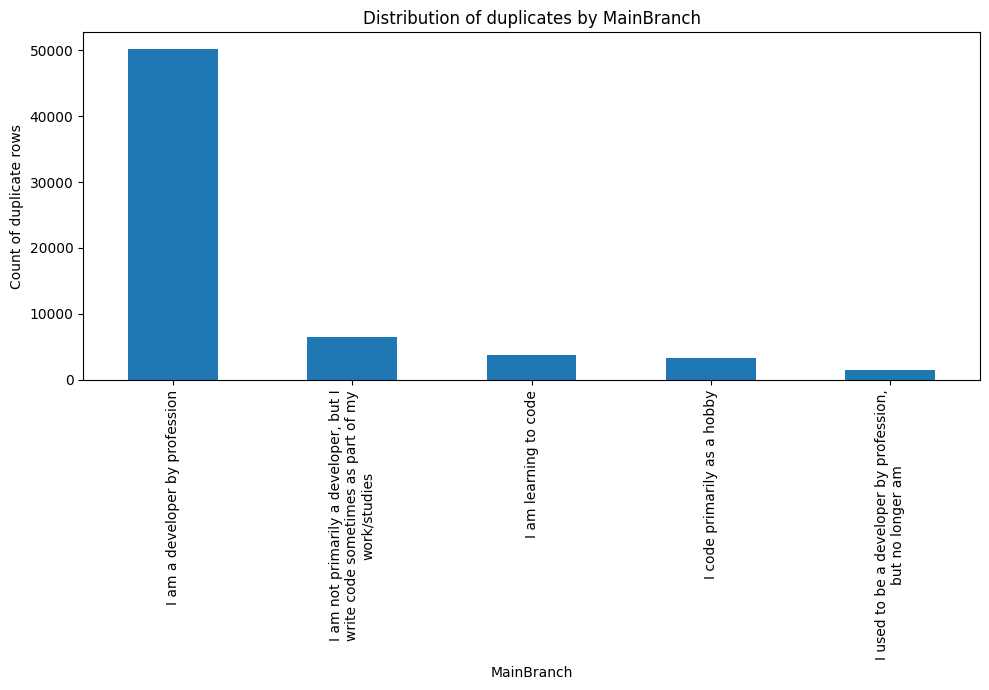
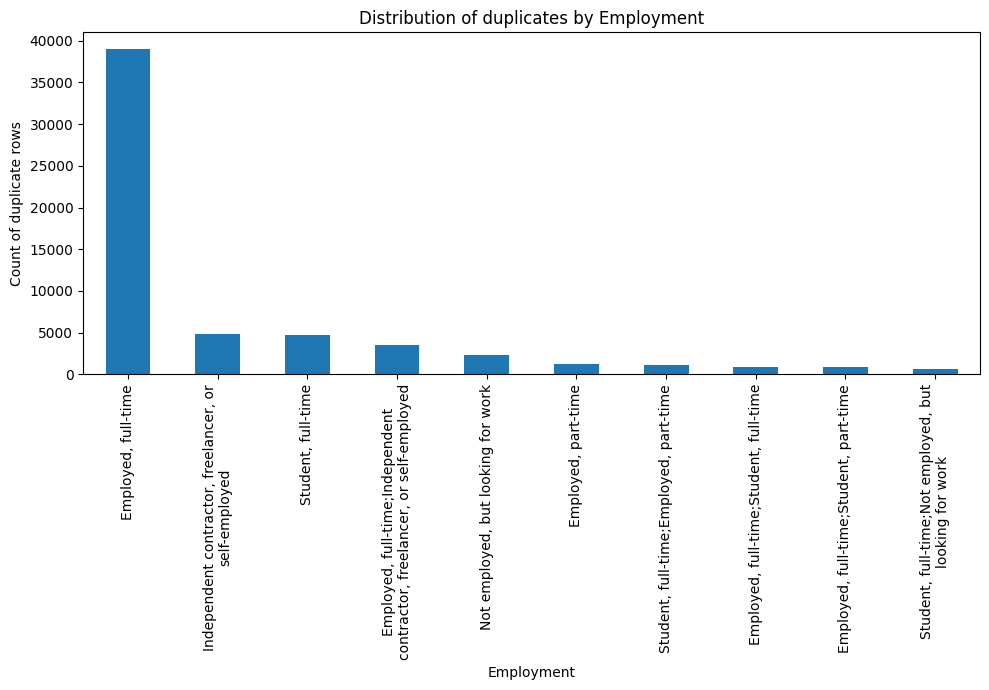
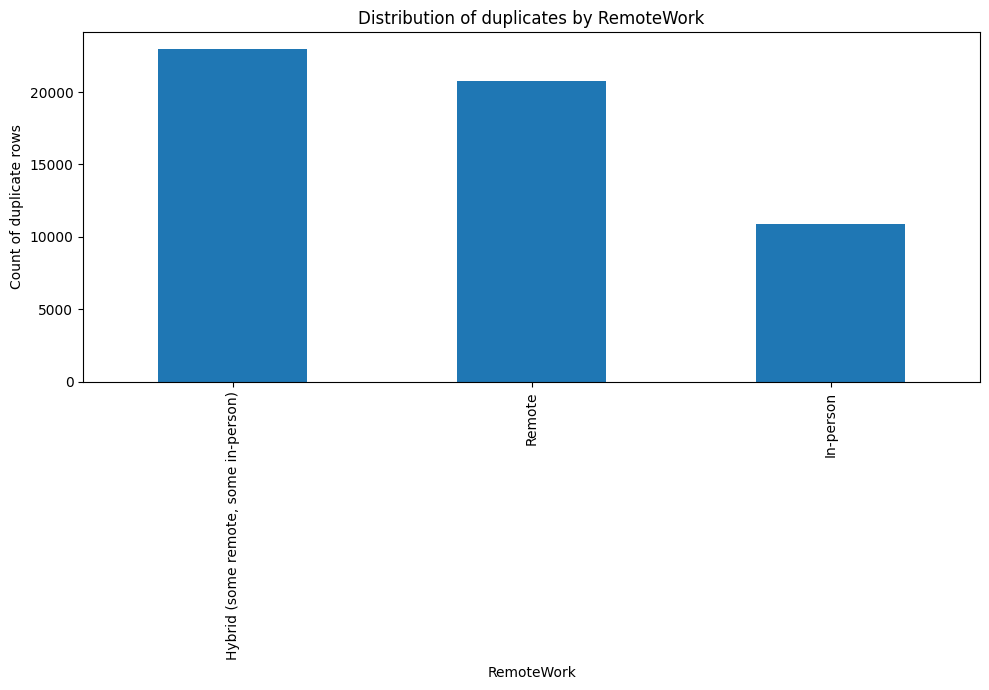
- Identify duplicate rows based on selected columns such as MainBranch, Employment, and RemoteWork. Analyse which columns frequently contain identical values within these duplicate rows.
- Analyse the characteristics of rows that are duplicates based on a subset of columns, such as MainBranch, Employment, and RemoteWork. Determine which columns frequently have identical values across these rows.
## Write your code here
subset_cols = ['MainBranch', 'Employment', 'RemoteWork']
dup_mask = df.duplicated(subset=subset_cols, keep=False)
dup_rows = df[dup_mask].copy() # all rows that belong to duplicated groups
print("Total rows:", df.shape[0])
print("Rows with duplicates (subset-based):", df[df.duplicated(subset=subset_cols)].shape[0])

cols_to_check = [c for c in df.columns if c not in subset_cols]
frdupl = []
for col in cols_to_check:
    nunique = dup_rows[col].nunique(dropna=False) # number of unique values for this column
    frdupl.append((col, round(((dup_rows[col].size - nunique) / dup_rows[col].size), 4)))
frdupl = sorted(frdupl, key=lambda n:n[1], reverse=True)
print('Fraction of duplicates in each column')
for i in range(10):
    print(*frdupl[i], sep=': ')
Total rows: 65457
Rows with duplicates (subset-based): 64896
Fraction of duplicates in each column
Check: 1.0
TBranch: 1.0
ICorPM: 1.0
Age: 0.9999
EdLevel: 0.9999
PurchaseInfluence: 0.9999
BuildvsBuy: 0.9999
SOVisitFreq: 0.9999
SOAccount: 0.9999
SOPartFreq: 0.9999
Task 3: Visualize Duplicates Distribution
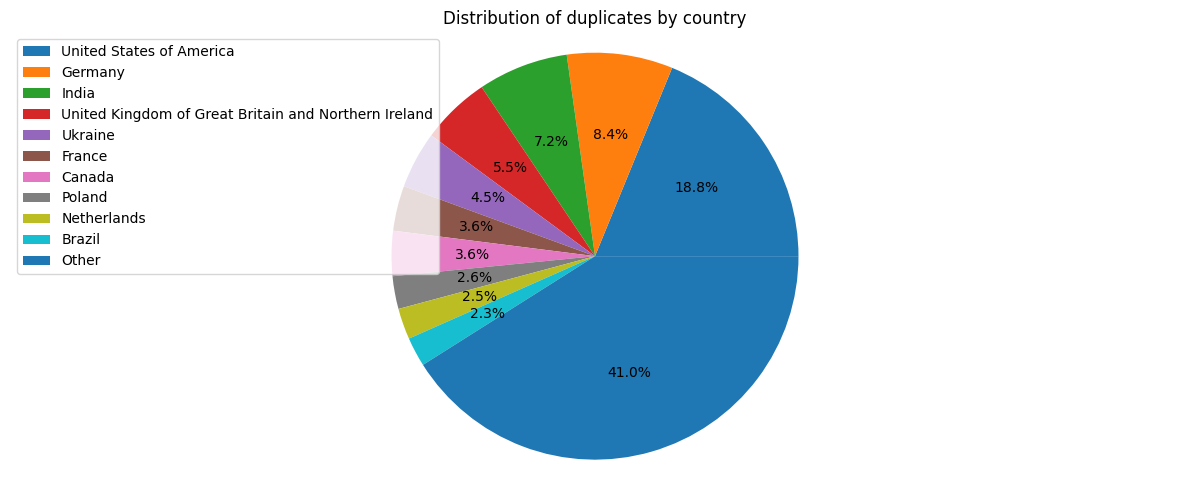
- Create visualizations to show the distribution of duplicates across different categories.
- Use bar charts or pie charts to represent the distribution of duplicates by Country and Employment.
subset_cols = ['MainBranch', 'Employment', 'RemoteWork']
dup_rows = df[df.duplicated(subset=subset_cols, keep=False)]

def wrap_labels(ax, width=40):
    labels = []
    for label in ax.get_xticklabels():
        text = label.get_text()
        labels.append(textwrap.fill(text, width=width))
    ax.set_xticklabels(labels, rotation=90)
# Count duplicates per category for each subset column
for col in subset_cols:
    plt.figure(figsize=(10, 7))
    colpl = dup_rows[col].value_counts()
    if colpl.size > 10:
        colpl = colpl.iloc[0:10]
    ax = colpl.plot(kind='bar')
    wrap_labels(ax)
    plt.title(f"Distribution of duplicates by {col}")
    plt.xlabel(col)
    plt.ylabel("Count of duplicate rows")
    plt.tight_layout()
    plt.show()
colpl = dup_rows['Country'].value_counts()
colpl1 = colpl.iloc[0:10]
colpl1['Other'] = colpl.iloc[10:].sum()
plt.figure(figsize=(12, 5))
ax1 = colpl1.plot(kind='pie', autopct='%1.1f%%', labels=None)
plt.title('Distribution of duplicates by country')
plt.legend(labels=colpl1.index, loc='upper left')
plt.tight_layout()
plt.axis('equal')
plt.show()
Task 4: Strategic Removal of Duplicates
- Decide which columns are critical for defining uniqueness in the dataset.
- Remove duplicates based on a subset of columns if complete row duplication is not a good criterion.
## Write your code here
frdupl = []
for col in df.columns:
    nunique = df[col].nunique(dropna=False) # number of unique values for this column
    frdupl.append((col, round(((df[col].size - nunique) / df[col].size), 4)))
frdupl = sorted(frdupl, key=lambda n:n[1])
print('Fraction of duplicates in each column')
for i in range(10):
    print(*frdupl[i], sep=': ')
Fraction of duplicates in each column
ResponseId: 0.0003
LanguageHaveWorkedWith: 0.6354
LanguageWantToWorkWith: 0.6521
ToolsTechHaveWorkedWith: 0.6962
ToolsTechWantToWorkWith: 0.7472
NEWCollabToolsHaveWorkedWith: 0.7835
LanguageAdmired: 0.8115
WebframeHaveWorkedWith: 0.8131
ToolsTechAdmired: 0.8197
WebframeWantToWorkWith: 0.8219
subset_cols_f = list(df.drop(['ResponseId'], axis=1).columns)
dup_rows_f = df[df.duplicated(subset=subset_cols_f)]
print('Number of duplicate rows:', dup_rows_f.shape[0])
Number of duplicate rows: 507
df.ResponseId.describe()
count    65457.000000
mean     32714.493591
std      18892.431636
min          1.000000
25%      16354.000000
50%      32716.000000
75%      49076.000000
max      65437.000000
Name: ResponseId, dtype: float64
df_f = df.drop_duplicates(subset=subset_cols_f)
print(df_f.shape)
(64950, 114)
Verify and Document Duplicate Removal Process
Task 5: Documentation
- Document the process of identifying and removing duplicates.
Write your explanation here
- Explain the reasoning behind selecting specific columns for identifying and removing duplicates.
Write your explanation here
The ResponseId column has the lowest fraction of duplicates. By removing this row during the search for duplicates (507 rows instead of only 20) we can get a dataframe with much lower number of duplicates.
Summary and Next Steps
In this lab, you focused on identifying and analyzing duplicate rows within the dataset.
- You employed various techniques to explore the nature of duplicates and applied strategic methods for their removal.
- For additional analysis, consider investigating the impact of duplicates on specific analyses and how their removal affects the results.
- This version of the lab is more focused on duplicate analysis and handling, providing a structured approach to deal with duplicates in a dataset effectively.