All data is stored on the chairs MariaDB database as specified in Settings -> CI/CD -> Variables and is accessible from the Petra Server only. However, the PhpMyAdmin allows access via browser. For the login, use same credentials as the backend does.
DB Schematics
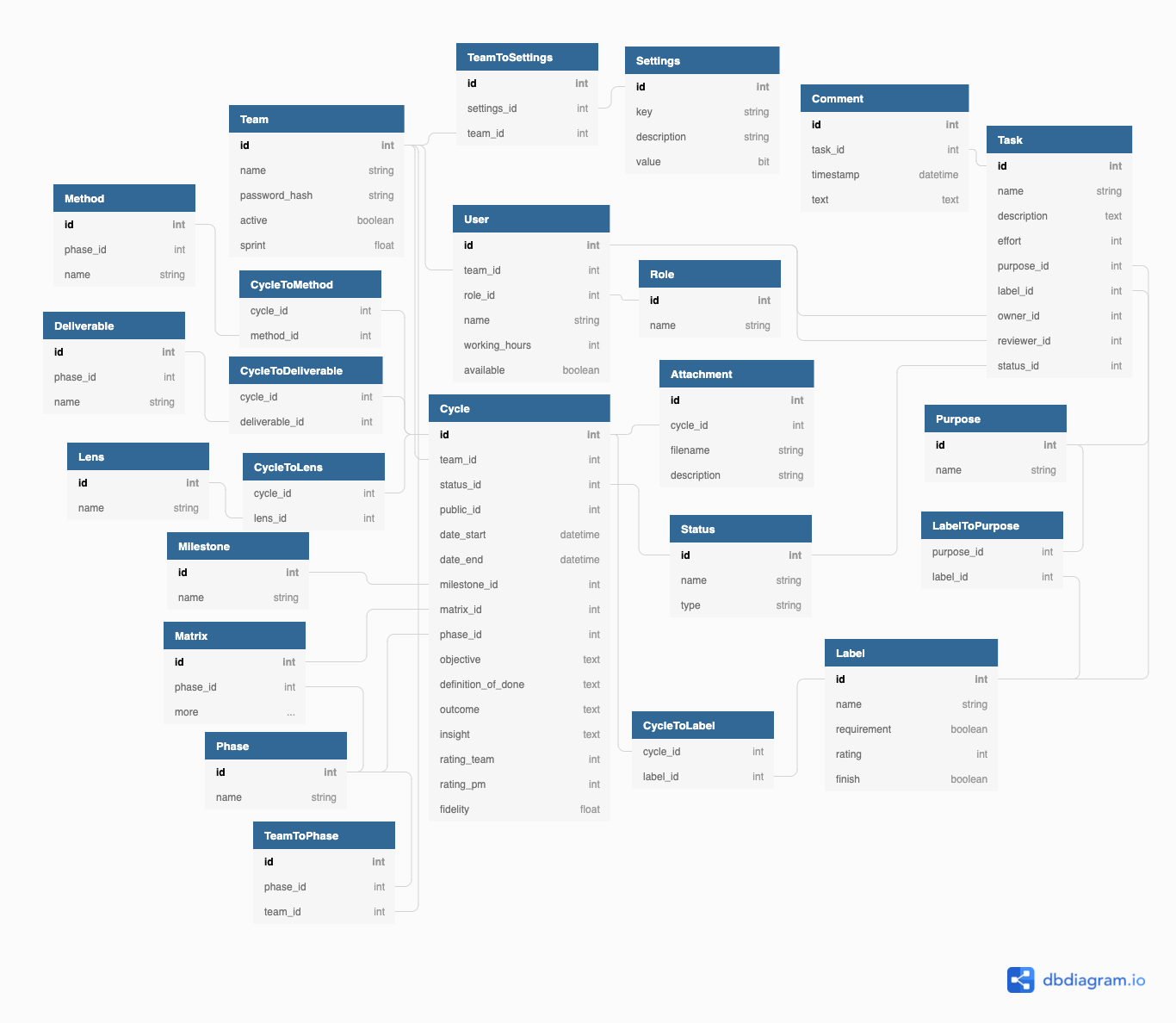
The database has the following entities and relationships with a cycle centric approach. The diagram can be forked at dbdiagram.io
Create Database
If no tables are present in the database e.g. after changing the database, flask automatically creates entities and relationships. For this to work, connect to a running docker backend container and execute
$ flask db upgrade
to create the tables and relations via SQLAlchemy and
$ flask shell
>>> from app import routes
>>> routes.setup_endpoint()
to add the default values e.g. Admin team.
Upgrade Database
The database entities and relationships are defined at backend/app/app/models.py.
However, after changing the models the database requires an upgrade handled by flask migrate.
Login to a running docker backend container that has access to the database (should already be the case, though) and execute the following to upgrade the database:
$ flask db migrate -m "<OPTIONAL MESSAGE>"
$ flask db upgrade
This, on the one hand, identifies changes applied to the models.py with an optional message and, on the other hand, persists these changes to the DB.