Welcome to the Petra Wiki summarizing development, manual deployment and CI/CD deployment in case something goes wrong or needs an upgrade. Otherwise, the stack should be deployed automatically by the the gitlab runners already configured. In case of a server restart, the docker stack restarts automatically.
Architecture
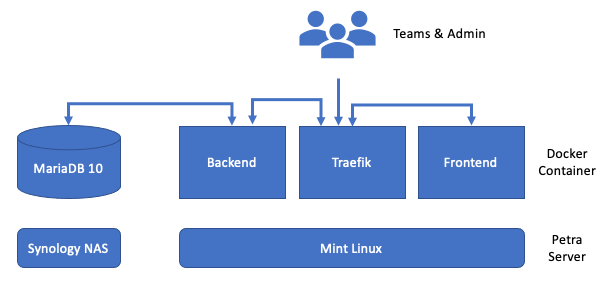
URLs
These are the URLs that will be used and generated by the project.
Development
Development URLs, for local development.
Frontend: http://localhost
Backend: http://localhost/api/
Traefik UI: http://localhost:8090
Endpoints
$ flask routes

Endpoint               Methods                 Rule
---------------------  ----------------------  -----------------------
auth_login             POST                    /api/auth/login
auth_logout            POST                    /api/auth/logout
auth_refresh           GET                     /api/auth/refresh
auth_register          POST                    /api/auth/register
auth_token             GET                     /api/auth/token
auth_user              GET                     /api/auth/user
backlog_endpoint       GET                     /api/board/backlog
board_endpoint         GET, PUT                /api/board
cycles_endpoint        DELETE, POST, PUT       /api/cycles
main                   GET                     /
matrix_endpoint        GET                     /api/matrix
module_endpoint        DELETE, GET, POST, PUT  /api/board/module
progress_endpoint      GET                     /api/progress
publications_endpoint  GET                     /api/publications
root                   GET                     /api/
route_frontend         GET                     /<path:path>
settings_endpoint      GET, POST               /api/settings
static                 GET                     /static/<path:filename>
task_endpoint          DELETE, GET, POST, PUT  /api/board/task
upload_endpoint        POST                    /api/upload
upload_filename        GET                     /api/uploads/<filename>
verify_token           POST                    /api/verify-token
Docker Containers
All docker containers are stored at Packages & Registries -> Container Registry with the latest tag prod
Environment Variables
The docker stack requires a set of environment variables for maximum flexibility as specified in Settings -> CI/CD -> Variables. For example, to change the database, simply change the DATABASE_NAME key to the new name and rebuild the stack.
CI_JOB_TOKEN: deploy tokens fromSettings -> Repository -> Deploy Tokens(read and write access)CI_REGISTRY:gitlab.lrz.de:5005DATABASE_IP: the database ip addressDATABASE_NAME: the database nameDATABASE_PASS: the database passwordDATABASE_PORT: the database portDATABASE_USER: the database usernameHOST_UPLOAD_FOLDER:/home/petra/uploadby default but can be different, create folder firstJWT_SECRET_KEY: long random string of bytes
FAQ
Q: In case of a new Synology, how to connect Petra to it?
The backend container connects via SQLAlchemy to the database with credentials from environment variables. During container build the Gitlab runners use the environment variables explained above i.e. `Settings -> CI/CD -> Variables`. Now, to change the related database credentials, e.g. the database ip, apply the following changes:- Enter new credentials by changing the values at
Settings -> CI/CD -> Variables - Trigger the container build by committing changes to the code (adding whitespace somewhere should be enough)
- Optionally: If the old database is still available, perform a backup of the tables and relationships and insert into the new database. Otherwise continue with (*).
- Register a new team to Petra and verify via phpMyAdmin if the new team was written to table
team.
(*) If no backup is available, ssh into the server and enter the backend container via docker exec -it <ID> bash to perform a flask db upgrade as explained in the wiki.
Q: In case of a power loss or server restart, what happens with Petra?
If the Petra server performs a power cycle the docker stack restores its state. Simply speaking: Containers restart automatically without any further assistance. Petra is back online within several minutes.Q: How to access the docker containers?
The containers are stored at `Packages & Registries -> Container Registry` and it is easy to [use images from](https://gitlab.lrz.de/help/user/packages/container_registry/index#use-images-from-the-container-registry) and [build and push images to] the Container Registry. Authentication with access tokens is required.Q: How to change text or headings within the frontend?
To change values in the frontend, within the repository navigate to `petra-web/frontend/src/{components, views}` depending on the texts location and click on a `*.vue` file.Next, click on Web IDE, perform changes on the right and click 'commit' on the lower left. Enter an appropriate commit message, e.g. what you've changed, select 'Commit to master branch' and click 'Commit' again.
This triggers the Gitlab pipeline building new containers to store in the Gitlab Container Registry. The Petra server downloads these new containers from the registry and deploys them according to the docker stack.
Q: How to export data from the DB?
A convenient way to access the database is phpMyAdmin using the same credentials as the backend.There, it is possible to export the database as SQL, CSV or CSV for MS Excel. For this, click on petradb on the left hand side and then Export on the navbar. Select your desired format and click 'Go'.
With phpMyAdmin it is also possible to perform queries and mutating entries.
Troubleshooting
Q: If the tool does not behave properly, how and where start to troubleshoot?
If the frontend is not responding, ssh into the server and check if the docker stack is running, i.e.
petra@petra-server:~$ docker ps
CONTAINER ID   IMAGE                                                       COMMAND                  CREATED        STATUS       PORTS             NAMES
3d89be7fd9e8   traefik:v2.2                                                "/entrypoint.sh --pr…"   8 hours ago    Up 8 hours   80/tcp            petra-prototyping-de_proxy.1.rf85e3729e2jdh6nc1z50jv8r
a4b2f4419399   gitlab.lrz.de:5005/martinspacheco/petra-web/backend:prod    "/entrypoint.sh /sta…"   8 hours ago    Up 8 hours   80/tcp, 443/tcp   petra-prototyping-de_backend.1.uvynyzg7ws5pobx22nnfanfvm
0e18c6cebe13   gitlab.lrz.de:5005/martinspacheco/petra-web/frontend:prod   "nginx -g 'daemon of…"   8 hours ago    Up 8 hours   80/tcp            petra-prototyping-de_frontend.1.r1t1s42ob7eczwpbvil9nykx4
801a434c484d   traefik:v2.2                                                "/entrypoint.sh --pr…"   8 hours ago    Up 8 hours   80/tcp            stag-petra-prototyping-de_proxy.1.ao3t55v1mssr4sfq9gwvbo5i1
c8d4a5d72f5e   gitlab.lrz.de:5005/martinspacheco/petra-web/frontend:stag   "nginx -g 'daemon of…"   8 hours ago    Up 8 hours   80/tcp            stag-petra-prototyping-de_frontend.1.39lyqxksmrzjo7h4s5zh71jsp
9ad147412346   gitlab.lrz.de:5005/martinspacheco/petra-web/backend:stag    "/entrypoint.sh /sta…"   8 hours ago    Up 8 hours   80/tcp, 443/tcp   stag-petra-prototyping-de_backend.1.3u4pjjqzu657vo7ewfliiacmx
4ce9f275cdce   traefik:v2.2                                                "/entrypoint.sh --pr…"   8 hours ago    Up 8 hours   80/tcp            traefik_traefik.1.vir6fmhw2gf2eu0fj3zeax0hi
5f2ed06187f3   gitlab/gitlab-runner:latest                                 "/usr/bin/dumb-init …"   2 months ago   Up 3 days                      gitlab-runner                                                             gitlab-runner
or
petra@petra-server:~$ docker stack ps petra-prototyping-de
ID             NAME                              IMAGE                                                       NODE           DESIRED STATE   CURRENT STATE         ERROR     PORTS
uvynyzg7ws5p   petra-prototyping-de_backend.1    gitlab.lrz.de:5005/martinspacheco/petra-web/backend:prod    petra-server   Running         Running 8 hours ago
r1t1s42ob7ec   petra-prototyping-de_frontend.1   gitlab.lrz.de:5005/martinspacheco/petra-web/frontend:prod   petra-server   Running         Running 8 hours ago
rf85e3729e2j   petra-prototyping-de_proxy.1      traefik:v2.2                                                petra-server   Running         Running 8 hours ago
where the backend, frontend, consul and traefik containers should be running.
If they are all up and running, observe the containers logs via
$ docker service logs <ID>
with <ID> from the previous command.